-
 Hızlı Kargo
-
 Güvenilir Alışveriş
h2>Contents (Hızlı Menü)
- 1 Kit Introduction / Kit Tanıtımı
- 2 Kit Contents / Kit İçeriği
- 3 Project List / Proje Listesi
- 4 Project Details / Proje Detayları
- 4.1 Project 1: Hello World / Merhaba Dünya
- 4.2 Project 2: LED Blinking / Yanıp Sönen LED
- 4.3 Project 3: PWM / PWM
- 4.4 Project 4: Traffic Light / Trafik Işığı
- 4.5 Project 5: LED Chasing Effect / LED Takip Efekti
- 4.6 Project 6: Button-controlled LED / Buton Kontrollü LED
- 4.7 Project 7: Active Buzzer / Aktif Buzzer
- 4.8 Project 8: Passive Buzzer / Pasif Buzzer
- 4.9 Project 9: RGB LED / RGB LED
- 4.10 Project 10: Photo Resistor / Fotorezistör
- 4.11 Project 11: Flame Sensor / Alev Sensörü
- 4.12 Project 12: LM35 Temperature Sensor / LM35 Sıcaklık Sensörü
- 4.13 Project 13: Tilt Switch / Eğim Kontağı
- 4.14 Project 14: IR Remote Control / IR Uzaktan Kumanda
- 4.15 Project 15: Analog Value Reading / Analog Değer Okuma
- 4.16 Project 16: 74HC595 / 74HC595 Yonga
- 4.17 Project 17: 1-digit LED Segment Display / 1-basamak LED Segment Gösterge
- 4.18 Project 18: 4-digit LED Segment Display / 4-basamak LeED Segment Gösterge
- 4.19 Project 19: 8*8 LED Matrix / 8×8 LED Matriks
- 4.20 Project 20: 1602 LCD / 1602 LCD
- 4.21 Project 21: 9g Servo Control / 9g Servo Kontrol
- 4.1 Project 1: Hello World / Merhaba Dünya
- 5 Resources / Kaynaklar
keyestudio Basic Starter Kit B for Mega / Temel Başlangıç Kiti B (MEGA 2560 R3 ile)
1. Kit Introduction / Kit Tanıtımı
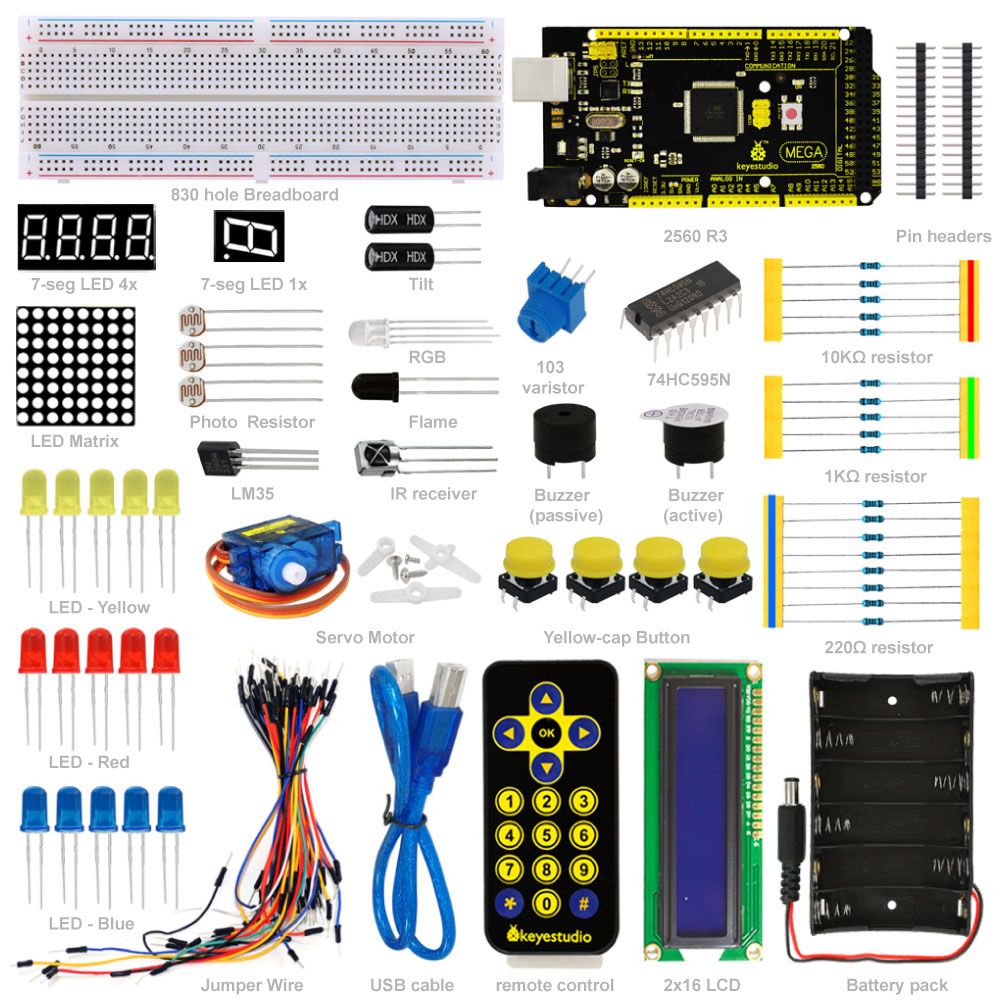
This is the basic Starter Kit, developed specially for those
beginners who are interested in Arduino. You will have a set of
Arduino’s most common and useful electronic components. What’s more. We
will offer you a detailed tutorials including project introduction and
their source codes.You may learn about Arduino through using these basic
projects. This kit will help you control the physical world with
sensors.
Bu,
Arduino ile ilgilenen yeni başlayanlar için özel olarak hazırlanan
temel Başlangıç Setidir. Arduino’nun en yaygın ve kullanışlı elektronik
bileşenlerine sahip olacaksınız. Dahası, size proje tanıtımı ve kaynak
kodları dahil olmak üzere ayrıntılı bir öğretici sunuyoruz. Bu temel
projeleri kullanarak Arduino hakkında bilgi edinebilirsiniz. Bu kit,
fiziksel dünyayı sensörler ile kontrol etmenize yardımcı olacak.
2.Kit Contents / Kit İçeriği
| Adet x Parça | ||
|---|---|---|
| 1 x Mega 2560 R3 Denetleyici | ||
| 5 x LED – Mavi | ||
| 5 x LED – Kırmızı | ||
| 5 x LED – Sarı | ||
| 1 x LED – RGB | ||
| 5 x 10K Ohm Direnç | ||
| 5 x 1K Ohm Direnç | ||
| 8 x 220 Ohm Direnç | ||
| 1 x 10K Ohm Direnç | ||
| 1 x 7-seg LED 1x modül | ||
| 1 x 7-seg LED 4x modül | ||
| 1 x 8×8 dot LED Düzeni | ||
| 1 x Buzzer (aktif) | ||
| 1 x Buzzer (pasif) | ||
| 1 x Alev sensör | ||
| 1 x IR Alıcı | ||
| 1 x IR Uzaktan Kumanda | ||
| 1 x LM35 Sıcaklık Sensörü | ||
| 2 x Ball Eğim sensörü | ||
| 3 x Fotorezistör | ||
| 4 x Küçük buton anahtar | ||
| 1 x IC 74HC595N 16-pin DIP | ||
| 1 x LCD 1602 | ||
| 1 x 9g servo | ||
| 1 x 830-pin Breadboard | ||
| Dupont Bağlantı Kablosu | ||
| 1 x 6 hücre AA Pil Yatağı | ||
| 1 x USB Kablo |
3. Project List / Proje Listesi
- 1. Hello World / Merhaba Dünya
- 2. LED Blinking / Yanıp Sönen LED
- 3. PWM / PWM
- 4. Traffic Light / Trafik Işığı
- 5. LED Chasing Effect / LED Takip Efekti
- 6. Button-controlled LED / Buton Kontrollü LED
- 7. Active Buzzer / Aktif Buzzer
- 8. Passive Buzzer / Pasif Buzzer
- 9. RGB LED / RGB LED
- 10. Photo Resistor / Fotorezistör
- 11. Flame Sensor / Alev Sensörü
- 12. LM35 Temperature Sensor / LM35 Sıcaklık Sensörü
- 13. Tilt Switch / Eğim Kontağı
- 14. IR Remote Control / IR Uzaktan Kumanda
- 15. Analog Value Reading / Analog Değer Okuma
- 16. 74HC595 / 74HC595 Yonga
- 17. 1-digit LED Segment Display / 1-basamak LED Segment gösterge
- 18. 4-digit LED Segment Display / 4-basamak LeED Segment gösterge
- 19. 8*8 LED Matrix / 8×8 LED Matriks
- 20. 1602 LCD / 1602 LCD
- 21. 9g Servo Control / 9g Servo Kontrol
4. Project Details / Proje Detayları
Project 1: Hello World / Merhaba Dünya
Introduction: / Tanıtım
As for starters, we will begin with something simple. In this
project, you only need an Arduino and a USB cable to start the “Hello
World!” experiment.This is not only a communication test of your Arduino
and PC, but also a primer project for you to have your first try in the
Arduino world!
Yeni
başlayanlar için basit bir şeyle başlayacağız. Bu “Hello World!”
(Merhaba Dünya) projesini başlatmak için sadece bir Arduino kart ve bir
USB
kablosuna ihtiyacınız var. deneme. Bu sadece Arduino ve PC’nizin
(kişisel bilgisayarınızın) bir
iletişim testi değil, aynı zamanda Arduino dünyasındaki ilk denemeniz
için
bir başlangıç projesidir!
Hardware Required: / Gerekli Donanım
1. Arduino board x1
2. USB cable x1
1. Arduino kart x1
2. USB kablosu x1
Sample Code: / Örnek Kod
After installing driver for Arduino, let’s open Arduino software and
compile the code that enables Arduino to print”Hello World!” under your
instruction. Of course, you can compile the code for Arduino to
continuously echo “Hello World!” without instruction. A simple If ()
statement will do the instruction trick. With the onboard LED connected
to pin 13, you can instruct the LED to blink first when Arduino gets an
instruction and then print the character”Hello World!”.
Arduino için sürücüyü kurduktan sonra, Arduino yazılımını açalım ve Arduino’nun “Hello World!” yazması için kodları girelim. Basit bir If () talimatı ile Arduino’nun sürekli ve aralıklı “Hello World!” yazmasını da sağlayabilirsiniz. Arduino bir talimat aldığında, Pin 13’e bağlı yerleşik LED’in, önce yanıp sönmesini, ardından “Merhaba Dünya!” yazdırmasını da sağlayabilirsiniz.
int val;//define variable val
int ledpin=13;// define digital interface 13
void setup()
{
Serial.begin(9600);// set the baud rate at 9600 to match the software set up. When connected to a specific device, (e.g. bluetooth), the baud rate needs to be the same with it.
pinMode(ledpin,OUTPUT);// initialize digital pin 13 as output. When using I/O ports on an Arduino, this kind of set up is always needed.
}
void loop()
{
val=Serial.read();// read the instruction or character from PC to Arduino, and assign them to Val.
if(val=='R')// determine if the instruction or character received is "R”.
{  // if it’s "R”,
digitalWrite(ledpin,HIGH);// set the LED on digital pin 13 on.
delay(500);
digitalWrite(ledpin,LOW);// set the LED on digital pin 13 off.
delay(500);
Serial.println("Hello World!");// display"Hello World!”string.
}
}
Result: / Sonuç

Click serial port monitor
Input R
LED 13 will blink once
PC will receive information from Arduino: Hello World
Seri port monitörüne tıklayın
kutucuğa R yazın
LED 13 bir kez yanıp sönecektir
PC Arduino’dan bilgi alacaktır: Merhaba Dünya
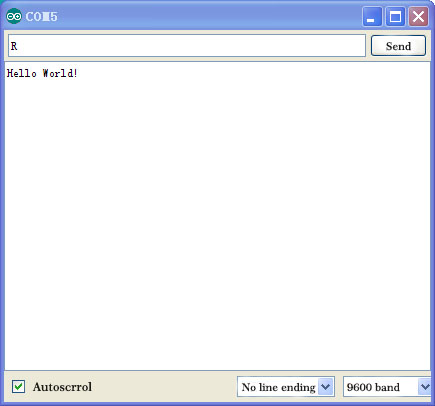
After choosing the right port, the experiment is very easy for you!
Doğru portu seçtiktiyseniz, deney sizin için çok kolaydır!
Project 2: LED Blinking / LED Yakıp Söndürme
Introduction: / Tanıtım
Blinking LED experiment is quite simple. In the “Hello World!”
program, we have come across LED. This time, we are going to connect an
LED to one of the digital pins rather than using LED13 which is soldered
to the board. Apart from an Arduino and a USB cable, you will need
extra parts as below:
Yanıp sönen LED deneyi oldukça basittir. “Merhaba Dünya!” programda LED ile tanıştık. Bu kez, karta lehimlenmiş LED13’ü kullanmak yerine dijital pinlerden birine LED bağlayacağız. Bir
Arduino kart ve bir USB kablosunun yanı sıra, aşağıdaki gibi ekstra
parçalara ihtiyacınız olacaktır:
Hardware Required:
1. Red M5 LED*1
2. 220? resistor*1
3. Breadboard*1
4. Breadboard jumper wires* several
1. Kırmızı M5 LED * 1
2. 220 Ohm direnç * 1
3. Breadboard * 1
4. Breadboard jumper kablo * birkaç adet