


-
 Hızlı Kargo
-
 Güvenilir Alışveriş
h2>Contents
- 1 keyestudio New sensor kit with MEGA 2560 R3 / keyestudio Yeni Sensör Kiti (MEGA 2560 R3 Dahil)
- 2 Summary / Özet
- 3 Kit list / Kit Listesi
- 4 Project details / Proje Detayları
- 4.1 Project 1: Piranha LED Module
- 4.2 Project 2: Digital white LED module
- 4.3 Project 3: Passive Buzzer module
- 4.4 Project 4: Hall Magnetic Sensor
- 4.5 Project 5: LM35 Linear Temperature Sensor
- 4.6 Project 6: 18B20 Temperature Sensor
- 4.7 Project 7: Digital Tilt Sensor
- 4.8 Project 8: Photocell sensor
- 4.9 Project 9: Digital Push Button
- 4.10 Project 10: Capacitive Touch Sensor
- 4.11 Project 11: DHT11 Temperature and Humidity Sensor
- 4.12 Project 12: Analog Sound Sensor
- 4.13 Project 13: Flame Sensor
- 4.14 Project 14: DS3231 Clock Module
- 4.15 Project 15: Analog Gas Sensor
- 4.16 Project 16: Analog Alcohol Sensor
- 4.17 Project 17: keyestudio Water Sensor
- 4.18 Project 18: Soil Humidity Sensor
- 4.19 Project 19: Infrared Obstacle Avoidance Sensor
- 4.20 Project 20: PIR Motion Sensor
- 4.21 Project 21: Joystick Module
- 4.22 Project 22: Photo interrupter module
- 4.23 Project 23: 5V Relay Module
- 4.24 Project 24: ADXL345 Three Axis Acceleration Module
- 4.25 Project 25: Rotary Encoder module
- 4.26 Project 26: Analog Rotation Sensor
- 4.27 Project 27: HC-SR04 Ultrasonic Sensor
- 4.28 Project 28: Pulse Rate Monitor
- 4.29 Project 29: Reed Switch Module
- 4.30 Project 30: TEMT6000 ambient light sensor
- 5 Resources / Kaynaklar
keyestudio New sensor kit with MEGA 2560 R3
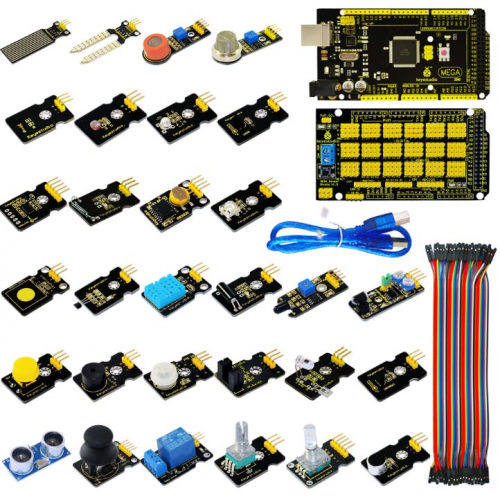
Sensor kit for Arduino
Based on open-source hardware
30 various sensors in one box
For you to make interesting projects
Summary / Özet
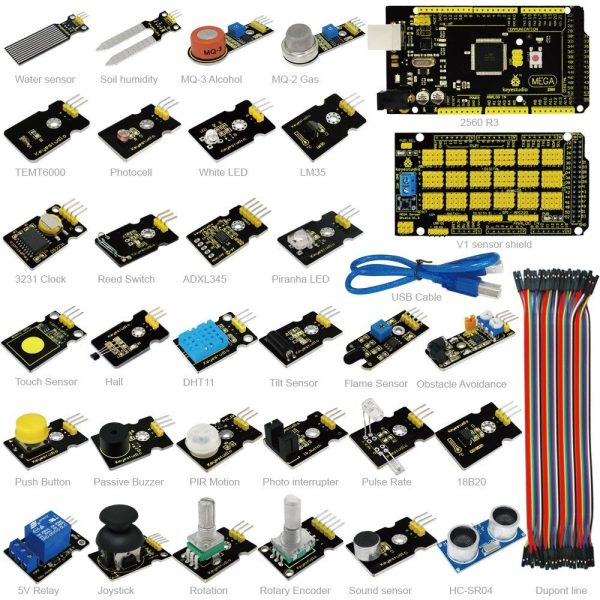
This is an Arduino sensor learning kit developed by Keyes. We bring together 30 basic sensors and modules, aiming for the convenience of its learning for starters. Inside this box, there are digital and analog sensors and also some special modules such as buzzer, ultrasonic, acceleration modules etc. For each module, there is clear connection diagram and sample code. So even if you are totally new at this, you can get started easily.
The sample codes for this sensor kit are based on ARDUINO because it’s open source and easy. And if you are good at this, you can also apply this kit to other MCU development platform, such as 51, STM32, Raspberries Pi. The working principle is pretty much the same.
Now, let us embrace this fascinating world of ARDUINO and learn together!
Bu, Keyes tarafından geliştirilen bir Arduino sensör öğrenme kitidir. Yeni başlayanlar için öğrenmenin kolaylığını hedefleyen 30 temel sensör ve modülü bir araya getiriyoruz. Bu kutunun içinde dijital ve analog sensörler ile buzzer (sesli uyarı), ultrasonik, ivme modülü vb. bazı özel modüller bulunur. Her modül için bağlantı şeması ve örnek kod vardır. Bu konuda tamamen yeni olsanız bile kolayca başlayabilirsiniz.
Bu sensör kitinin örnek kodları ARDUINO tabanlıdır, çünkü açık kaynak kodlu ve kolaydır. Bu konuda iyiyseniz, bu kiti 51, STM32, Raspberries Pi gibi diğer MCU geliştirme platformlarına da uygulayabilirsiniz. Çalışma prensibi hemen hemen aynıdır.
Şimdi, ARDUINO’nun bu büyüleyici dünyasını kucaklayalım ve birlikte öğrenelim!
Kit list / Kit Listesi
|
1. Piranha LED Module 29. MEGA 2560 R3 Board
|
1. Piranha LED Modül 29. MEGA 2560 R3 Denetleyici
|
Project details / Proje Detayları
Project 1: Piranha LED Module
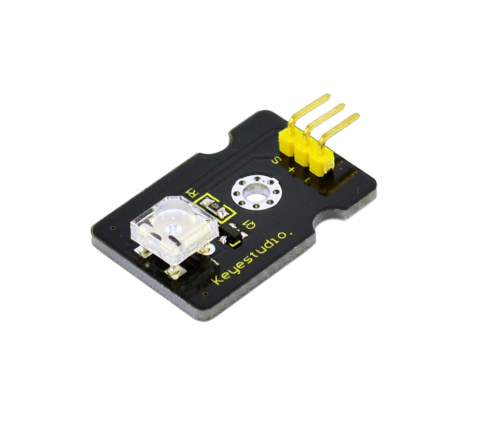
Introduction:
This is a special LED module. When you connect it to ARDUINO development board, after program, it can emit beautiful light. Of course, you can also control it using PWM. It will be like fireflies at night. Isn’t cool? We can also combine it with other sensors to do various interesting interactive experiments.
Specifications:
Module type: digital
Working voltage: 5v
Distance between pins: 2.54mm
Size: 30*20mm
Weight: 3g
Connection Diagram:
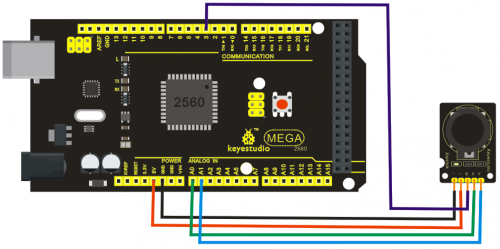
Sample Code:
int led = 3;
void setup()
{
  pinMode(led, OUTPUT);     //Set Pin3 as output
}
void loop()
{      digitalWrite(led, HIGH);   //Turn off led
          delay(2000);
          digitalWrite(led, LOW);    //Turn on led
          delay(2000);
}
Project 2: Digital white LED module
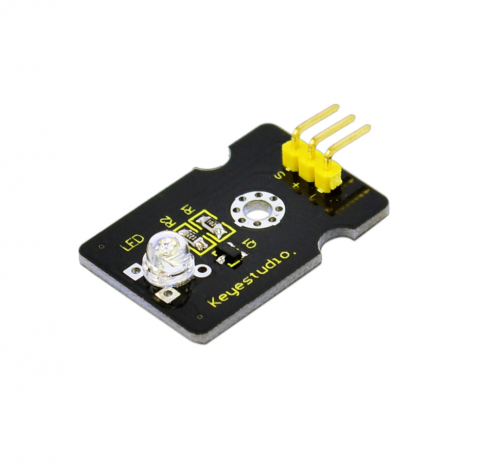
Introduction:
This LED light module has a shiny color, ideal for Arduino starters. It can be easily connected to IO/Sensor shield.
Specification:
Type: Digital
PH2.54 socket
White LED light module
Enables interaction with light-related works
Size: 30*20mm
Weight: 3g
Connection Diagram:
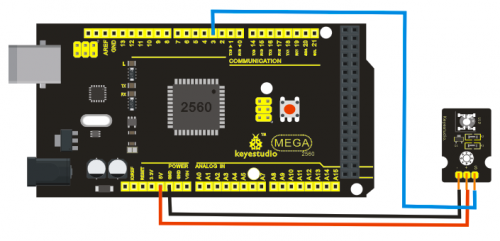
Sample Code:
int led = 3;
void setup()
{
 pinMode(led, OUTPUT);     //Set Pin3 as output
}
void loop()
{
         digitalWrite(led, HIGH);   //Turn on led
         delay(2000);
         digitalWrite(led, LOW);    //Turn off led
         delay(2000);
}
Project 3: Passive Buzzer module
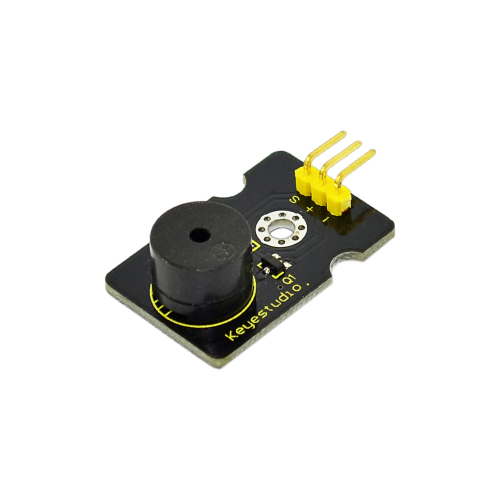
Introduction:
We can use Arduino to make many interactive works of which the most commonly seen is acoustic-optic display. All the previous experiment has something to do with LED. However, the circuit in this experiment can produce sound. Normally, the experiment is done with a buzzer or a speaker while buzzer is simpler and easier to use. The buzzer we introduced here is a passive buzzer. It cannot be actuated by itself, but by external pulse frequencies. Different frequencies produce different sounds. We can use Arduino to code the melody of a song, which is actually quite fun and simple.
Specification:
Working voltage: 3.3-5v
Interface type: digital
Size: 30*20mm
Weight: 4g
Connection Diagram:
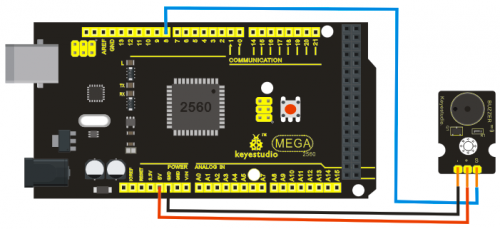
Sample Code:
int buzzer=8;//set digital IO pin of the buzzer
void setup()
{
pinMode(buzzer,OUTPUT);// set digital IO pin pattern, OUTPUT to be output
}
void loop()
{ unsigned char i,j;//define variable
while(1)
{ for(i=0;i<80;i++)// output a frequency sound
{ digitalWrite(buzzer,HIGH);// sound
delay(1);//delay1ms
digitalWrite(buzzer,LOW);//not sound
delay(1);//ms delay
}
for(i=0;i<100;i++)// output a frequency sound
{
digitalWrite(buzzer,HIGH);// sound
digitalWrite(buzzer,LOW);//not sound
delay(2);//2ms delay
} } }
After downloading the program, buzzer experiment will been finished.
Project 4: Hall Magnetic Sensor
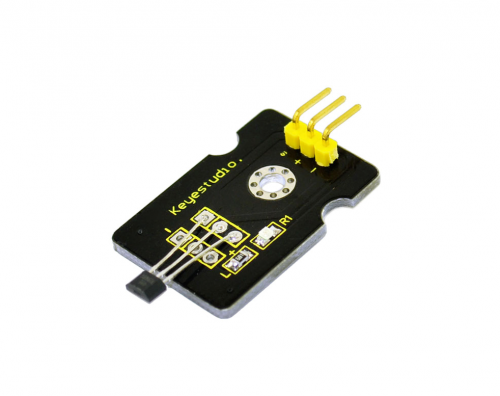
Introduction:
This is a Magnetic Induction Sensor. It senses the magnetic materials within a detection range up to 3cm. The detection range and the strength of the magnetic field are proportional. The output is digital on/off. This sensor uses the SFE Reed Switch – Magnetic Field Sensor.
Specification:
Sensing magnetic materials
Detection range: up to 3cm
Output: digital on/off
Detection range and magnetic field strength are proportional
Size: 30*20mm
Weight: 3g
Connection Diagram:
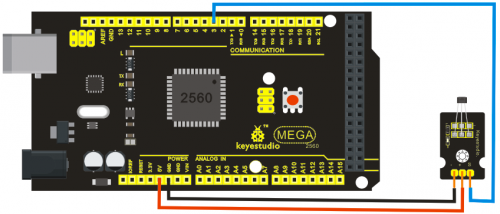
Sample Code:
int ledPin = 13;                // choose the pin for the LED
int inputPin = 3;               // Connect sensor to input pin 3
int val = 0;                    // variable for reading the pin status

void setup() {
  pinMode(ledPin, OUTPUT);      // declare LED as output
  pinMode(inputPin, INPUT);     // declare pushbutton as input
}

void loop(){
  val = digitalRead(inputPin);  // read input value
  if (val == HIGH) {            // check if the input is HIGH
    digitalWrite(ledPin, LOW);  // turn LED OFF
  } else {
    digitalWrite(ledPin, HIGH); // turn LED ON
  }
}
Project 5: LM35 Linear Temperature Sensor
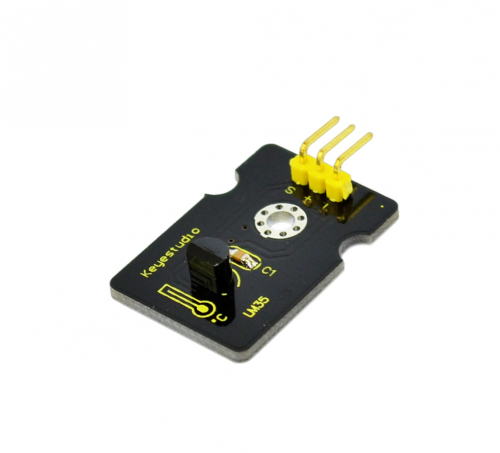
Introduction:
LM35 Linear Temperature Sensor is based on semiconductor LM35 temperature sensor. It can be used to detect ambient air temperature. This sensor offers a functional range among 0 degree Celsius to 100 degree Celsius. Sensitivity is 10mV per degree Celsius. The output voltage is proportional to the temperature.
This sensor is commonly used as a temperature measurement sensor. It includes thermocouples, platinum resistance, and thermal resistance and temperature semiconductor chips. The chip is commonly used in high temperature measurement thermocouples. Platinum resistance temperature sensor is used in the measurement of 800 degrees Celsius, while the thermal resistance and semiconductor temperature sensor is suitable for measuring the temperature of 100-200 degrees or below, in which the application of a simple semiconductor temperature sensor is good in linearity and high in sensitivity. The LM35 linear temperature sensor and sensor-specific Arduino shield can be easily combined.
Specification:
Based on the semiconductor LM35 temperature sensor
Can be used to detect ambient air temperature
Sensitivity: 10mV per degree Celcius
Functional range: 0 degree Celsius to 100 degree Celsius
Size: 30*20mm
Weight: 3g
Connection Diagram:
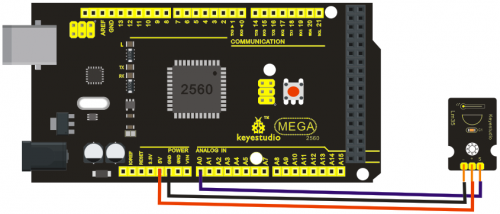
Sample Code:
void setup()
{
    Serial.begin(9600);//Set Baud Rate to 9600 bps
}
 void loop()
{
    int val;
    int dat;
    val=analogRead(0);//Connect LM35 on Analog 0
    dat=(500 * val) /1024;;
    Serial.print("Temp:"); //Display the temperature on Serial monitor
    Serial.print(dat);
    Serial.println("C");
    delay(500);
}
Project 6: 18B20 Temperature Sensor
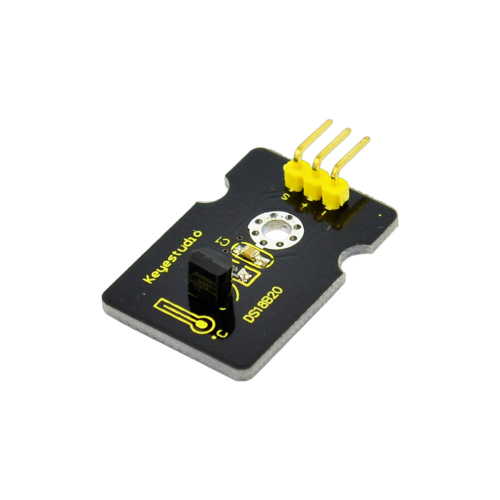
Introduction:
DS18B20 is a digital temperature sensor from DALLAS U.S. It can be used to quantify environmental temperature testing.
The temperature range is -55 ~ +125 ?, inherent temperature resolution 0.5 ?. It also support multi-point mesh networking. Three DS18B20 can be deployed on three lines to achieve multi-point temperature measurement. It has a 9-12 bit serial output.
Specification:
Supply Voltage: 3.3V to 5V
Temperature range: -55 °C ~ +125 °C
Interface: Digital
Size: 30*20mm
Weight: 3g
Connection Diagram:
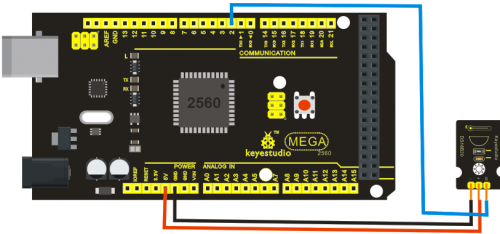
Sample Code:
http://www.pjrc.com/teensy/arduino_libraries/OneWire.zip
#include <OneWire.h>
 int DS18S20_Pin = 2; //DS18S20 Signal pin on digital 2
 //Temperature chip i/o
OneWire ds(DS18S20_Pin);  // on digital pin 2
 void setup(void) {
  Serial.begin(9600);
}
 void loop(void) {
  float temperature = getTemp();
  Serial.println(temperature);

  delay(100); //just here to slow down the output so it is easier to read

}

float getTemp(){
  //returns the temperature from one DS18S20 in DEG Celsius

  byte data[12];
  byte addr[8];

  if ( !ds.search(addr)) {
      //no more sensors on chain, reset search
      ds.reset_search();
      return -1000;
  }

  if ( OneWire::crc8( addr, 7) != addr[7]) {
      Serial.println("CRC is not valid!");
      return -1000;
  }

  if ( addr[0] != 0x10 && addr[0] != 0x28) {
      Serial.print("Device is not recognized");
      return -1000;
  }

  ds.reset();
  ds.select(addr);
  ds.write(0x44,1); // start conversion, with parasite power on at the end

  byte present = ds.reset();
  ds.select(addr);
  ds.write(0xBE); // Read Scratchpad


  for (int i = 0; i < 9; i++) { // we need 9 bytes
    data[i] = ds.read();
  }
  ds.reset_search();

  byte MSB = data[1];
  byte LSB = data[0];

  float tempRead = ((MSB << 8) | LSB); //using two's compliment
  float TemperatureSum = tempRead / 16;

  return TemperatureSum;
}
Project 7: Digital Tilt Sensor
Introduction:
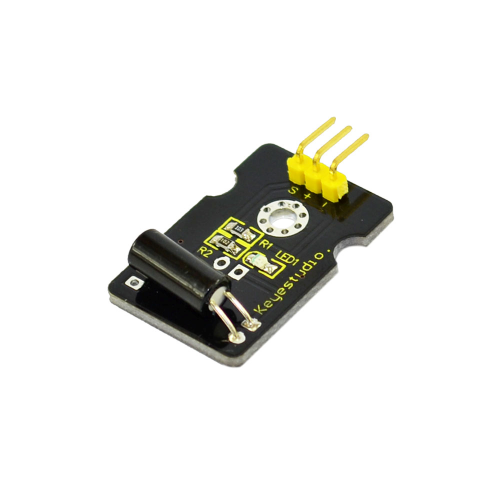
Tilt Sensor is a digital tilt switch. It can be used as a simple tilt sensor. Simplly plug it to our IO/Sensor shield; you can make amazing interactive projects. With dedicated sensor shield and Arduino, you can achieve interesting and interactive work.
Specification:
Supply Voltage: 3.3V to 5V
Interface: Digital
Size: 30*20mm
Weight: 3g
Connection Diagram:
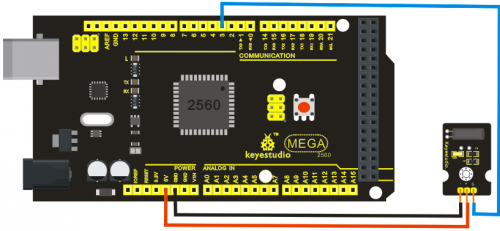
Sample Code:
int ledPin = 13;                // Connect LED to pin 13
int switcher = 3;                 // Connect Tilt sensor to Pin3

void setup()
{
  pinMode(ledPin, OUTPUT);      // Set digital pin 13 to output mode
  pinMode(switcher, INPUT);       // Set digital pin 3 to input mode
}
void loop()
{

   if(digitalRead(switcher)==HIGH) //Read sensor value
     {
        digitalWrite(ledPin, HIGH);   // Turn on LED when the sensor is tilted
     }
   else
     {
        digitalWrite(ledPin, LOW);    // Turn off LED when the sensor is not triggered
     }
}
Project 8: Photocell sensor
Introduction:
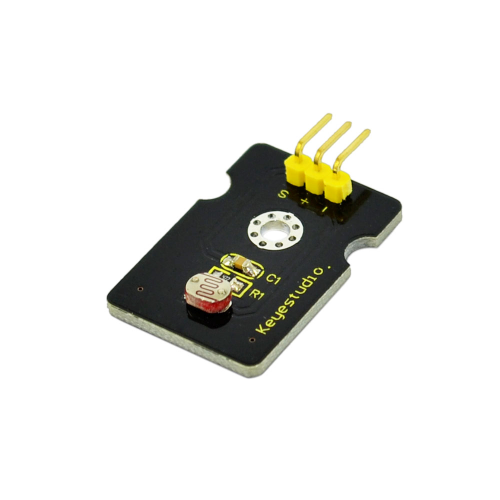
Photocell is commonly seen in our daily life and is mainly used in intelligent switch, also in common electronic design. To make it easier and more effective, we supply corresponding modules.
Photocell is a semiconductor. It has features of high sensitivity, quick response, spectral characteristic, and R-value consistence, maintaining high stability and reliability in environment extremes such as high temperature, high humidity. It’s widely used in automatic control switch fields like cameras, garden solar lights, lawn lamps, money detectors, quartz clocks, music cups, gift boxes, mini night lights, sound and light control switches, etc.
Specification:
Interface type: analog
Working voltage: 5V
Size: 30*20mm
Weight: 3g
Connection Diagram:
Sample Code:
int sensorPin =A0 ;
int value = 0;
void setup()
{
 Serial.begin(9600); }

void loop()
{
 value = analogRead(sensorPin);
Serial.println(value, DEC);

delay(50); }
Project 9: Digital Push Button
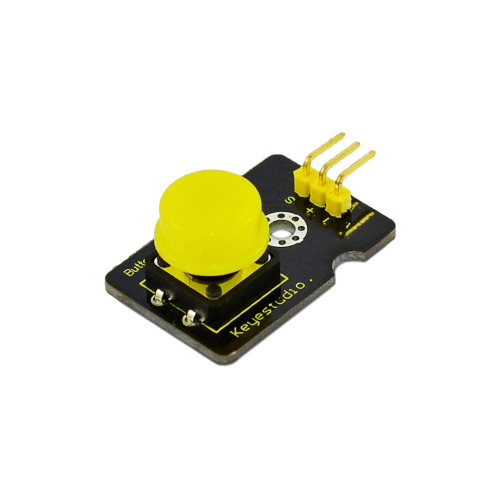
Introduction:
This is a basic application module. You can simply plug it into an IO shield to have your first taste of Arduino.



Değerlendirmeler
Filtreyi TemizleHenüz değerlendirme yapılmadı.